PRACTICAL ENVIRONMENT
Our OpenStack Lab Architecture
A simple single-node DevStack learning environment, accessed from a Windows-based Dell laptop over the local network.
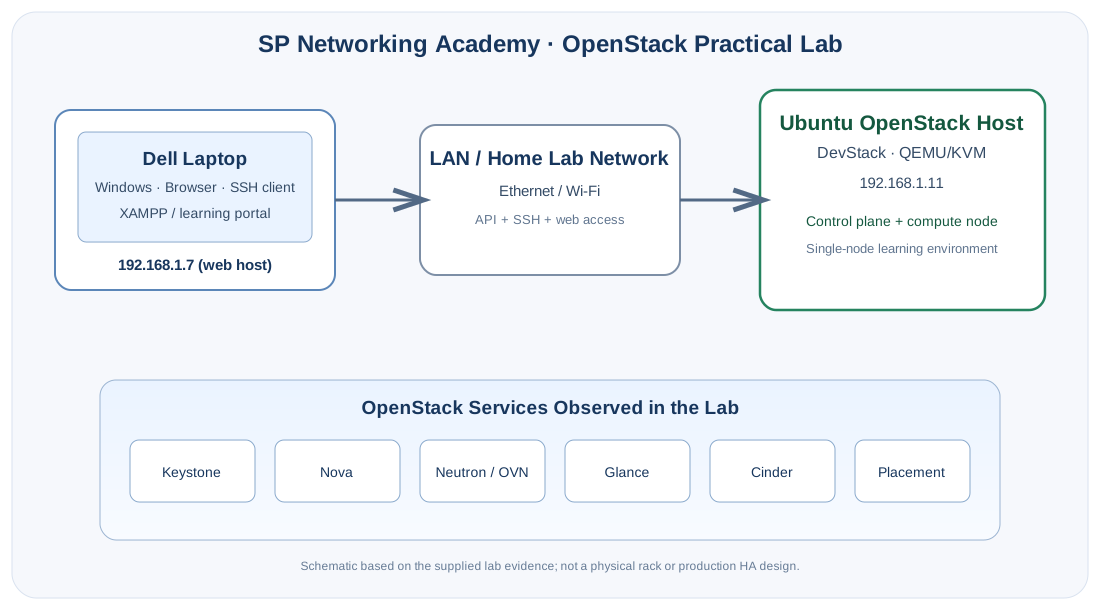
Client / management side
- Dell laptop running Windows
- Browser and SSH terminal used for administration and study
- Local XAMPP web host observed at
192.168.1.7 - Used to access the learning portal and lab host
OpenStack host
- Ubuntu Linux server / DevStack
- Host address observed in evidence:
192.168.1.11 - QEMU hypervisor reported by the lab
- Services include Keystone, Nova, Neutron/OVN, Glance, Cinder and Placement
Accuracy note: This is a learning topology diagram, not a physical rack diagram. It is based on the supplied screenshots and terminal evidence. Confirm exact laptop model, Ubuntu release, CPU/RAM, storage layout, network interface names and any router/switch details before publishing those specifications to students.